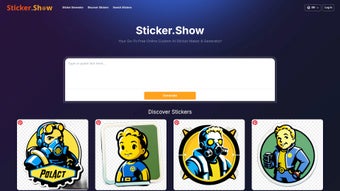

Download Sticker Show – Free AI Sticker Maker, Design Custom Stickers Online
Overview
Sticker Show is a web‑based graphics tool that lets anyone create custom stickers in a matter of minutes. Powered by artificial intelligence, the platform can turn a simple keyword, phrase, or hand‑drawn sketch into a collection of polished designs ready for download. Because it runs entirely in the browser, there is no need to install bulky software or worry about operating‑system compatibility; the same URL works on Windows PCs, macOS laptops, Android tablets, and iOS phones.
The free tier provides unlimited personal projects, unlimited downloads, and access to a searchable library of pre‑made assets. For businesses or power users, a paid upgrade unlocks high‑resolution exports, commercial‑use licensing, and priority AI processing. Whether you are a casual messenger who wants a quirky emoji, a small‑business owner looking to add brand stickers to a marketing campaign, or a designer seeking a rapid prototyping tool, Sticker Show offers a fast, secure, and cost‑effective solution.
The AI engine suggests multiple design variations, while an intuitive drag‑and‑drop canvas lets you fine‑tune colors, typography, and layout without any prior design experience. All creations are stored in the cloud, with optional syncing to Google Drive or Dropbox, ensuring that your work is safe and accessible from any device. In short, Sticker Show combines the convenience of a SaaS app with the creative power of AI, making it the go‑to sticker maker for both personal fun and professional branding.
Key Features
- AI‑Powered Design Assistant: Input a concept, keyword, or sketch and receive 5‑10 AI‑generated variations within seconds.
- Drag‑and‑Drop Canvas: Edit shapes, colors, fonts, and layers with a responsive interface that feels like a desktop design suite.
- Vast Asset Library: Access thousands of pre‑made stickers, icons, and templates for instant inspiration.
- Multiple Export Formats: Download stickers as PNG (transparent), SVG (scalable vector), or GIF (animated) with a single click.
- Brand Management Tools: Save brand palettes, upload logos, and apply consistent styling across multiple sticker sets.
- Real‑Time Collaboration: Share a live editing link with teammates or clients for instant feedback.
- Unlimited Free Use: No hidden caps on the number of personal stickers you can create or download.
- Cross‑Platform Compatibility: Works on any modern browser (Chrome, Firefox, Safari, Edge) across Windows, macOS, Linux, Android, and iOS.
- Secure Cloud Storage: Projects are saved with SSL encryption and can be exported to popular cloud services.
- Regular Feature Updates: Monthly releases add new templates, improve AI accuracy, and enhance performance.
Installation, Usage & Compatibility
Sticker Show requires no traditional installation. Simply open a supported web browser, navigate to the official site, and you are ready to start designing. Follow these steps to launch your first project:
- Open a Modern Browser: Chrome 80+, Firefox 75+, Safari 13+, or Edge 80+ on any device.
- Visit sticker.show: The homepage presents a clear “Create Sticker” button.
- Create an Account (Optional): Signing in saves your work to the cloud and enables collaboration links.
- Select a Creation Mode: Choose “AI Suggest” for automatic design ideas or “Blank Canvas” for full manual control.
- Enter Your Concept: Type a keyword (e.g., “sunset”, “gaming”), upload a sketch, or describe a mood.
- Refine the Design: Use the left‑hand toolbar to adjust colors, add text, swap icons, or resize elements. All changes update instantly.
- Preview on Messaging Apps: Click “Preview” to see how the sticker appears on WhatsApp, Telegram, iMessage, or Discord.
- Export Your Sticker: Choose PNG, SVG, or GIF. Premium users can select high‑dpi PNG for print‑ready output.
- Share or Save: Use the built‑in share link, export to Google Drive/Dropbox, or download directly to your device.
Because the AI processing occurs on Sticker Show’s servers, the client device only needs a stable internet connection (minimum 5 Mbps) and basic hardware (2 GHz CPU, 4 GB RAM). No GPU is required, making the tool suitable for older laptops and budget smartphones. For users who prefer an app‑like experience, the platform supports progressive web‑app (PWA) installation: tap “Add to Home Screen” in your browser to launch Sticker Show from your device’s home screen with offline caching of recent projects.
Pros, Cons & Frequently Asked Questions
Pros
- Free core features with unlimited personal sticker creation.
- AI‑driven suggestions dramatically cut design time.
- No download required; works in any modern browser.
- Extensive library of pre‑made assets for quick starts.
- Multiple export formats including vector SVG and animated GIF.
- Real‑time collaboration link simplifies teamwork.
- Secure cloud storage with SSL encryption and GDPR compliance.
- Regular updates keep the tool fresh and improve AI quality.
Cons
- Commercial licensing and high‑resolution exports require a paid plan.
- AI suggestions can occasionally be generic and need manual tweaking.
- Large file uploads (>10 MB) may be slow on weak connections.
- Offline functionality is limited to previously cached projects.
- No native desktop application for users who prefer a standalone program.
Is Sticker Show truly free for personal use?
Yes. All core design tools, AI suggestions, and unlimited downloads are available at no cost for personal or non‑commercial projects.
Do I need to install any plugins or extensions?
No. Sticker Show runs entirely in the browser. As long as JavaScript is enabled and you use a supported browser, you can start designing immediately.
Can I use the stickers I create for commercial purposes?
Commercial use is permitted with a paid subscription that provides a royalty‑free license. Free‑tier stickers are limited to personal or non‑profit use.
What export formats are supported?
Sticker Show exports to PNG (transparent background), SVG (vector), and GIF (animated). Premium users also receive high‑dpi PNG for print‑ready assets.
Is my data safe in the cloud?
Yes. All projects are stored using SSL‑encrypted connections and hosted on servers that comply with GDPR and CCPA standards. Users can delete any project at any time.
Conclusion & Call to Action
Sticker Show stands out as the most accessible AI‑driven sticker maker on the market. Its zero‑cost entry point, powerful design assistant, and truly cross‑platform nature make it ideal for anyone who wants to add a personal touch to chats, social media posts, or brand collateral. While the free tier already delivers a rich set of tools, businesses that need high‑resolution assets or commercial licensing will find the premium plan a worthwhile investment. Ready to start creating eye‑catching stickers without installing anything? Visit sticker.show, sign up in seconds, and unleash your creativity today.



.png)



